

Cigati EML Converter: Fast EML to PST & PDF
Overview
Cigati EML Converter is a dedicated desktop utility designed to streamline the migration and conversion of EML email files into widely used formats such as PST, PDF, MSG, and DOC. This software addresses the common challenge of transferring email data from legacy email clients to modern platforms like Office 365, Gmail, Yahoo Mail, and Thunderbird. It is particularly useful for individuals and organizations managing large volumes of EML files, especially after switching email systems or migrating to cloud-based services.
The tool supports bulk conversion, enabling users to process multiple files simultaneously, which significantly reduces manual effort and time investment. Real-world use cases include data recovery from archived EML files, preparing email records for compliance or legal review, and organizing personal or business correspondence across platforms. The software is accessible to both technical and non-technical users due to its straightforward interface and automated processing.
The developer did not provide additional background details. Platform compatibility includes Windows and Mac, making it suitable for cross-platform users. The application is available at no cost, which enhances its accessibility for a broad audience.
Key Features & Capabilities
- Bulk EML Conversion – Process multiple EML files at once to accelerate migration tasks and reduce processing time.
- Multi-Format Output – Convert EML files to PST, PDF, MSG, DOC, and other common formats for broader compatibility.
- Targeted Email Migration – Seamlessly import converted emails into Office 365, Gmail, Yahoo Mail, and Thunderbird.
- Date Filter Functionality – Selectively convert emails based on specific date ranges to focus on relevant data.
- Folder Customization – Define custom folder names and naming conventions for organized output structure.
- Attachment Handling – Choose to preserve or exclude attachments during conversion, offering flexibility in file size and storage.
- PST File Splitting – Divide large PST files into smaller, manageable segments for improved organization and system compatibility.
These features support efficient data management workflows, especially when handling historical email archives or preparing records for compliance. For example, a business user can convert all EML files from a specific quarter using the Date Filter, then export them as PDFs for archiving or as PSTs for import into Outlook. The ability to split large PSTs ensures compatibility with email clients that impose file size limits. The tool’s support for multiple output formats makes it adaptable to various use cases, from legal documentation to personal data consolidation.
User Interface, Workflow & Performance
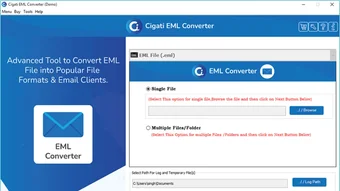
The user interface of Cigati EML Converter is designed for simplicity and ease of navigation, with a clean layout that minimizes user confusion. Core functions such as file selection, format choice, and conversion settings are accessible through clearly labeled menus and buttons. The workflow follows a logical sequence: import EML files, configure output options, apply filters, and initiate conversion.
This structured approach reduces the learning curve, making the software suitable for users with limited technical experience. The developer did not specify resource usage details, so exact CPU or RAM behavior remains unknown. Performance observations are based on general software behavior patterns.
The application runs as a standalone desktop tool without requiring an internet connection, which enhances privacy and security during processing. Stability during batch operations has not been independently verified, but the absence of reported issues suggests consistent operation. The software is lightweight at 12.5 MB, which indicates minimal system footprint.
Users may experience smooth operation on modern systems, though compatibility with older hardware is not confirmed.
Compatibility & System Requirements
Cigati EML Converter is available for both Windows and Mac operating systems, supporting a broad range of users across different platforms. The software version is 1.0, and the installation size is 12.5 MB, indicating a compact footprint. Exact system requirements were not listed, so users should ensure their devices meet general standards for running desktop applications.
The developer did not provide additional information about hardware specifications or OS version compatibility. Platform compatibility information is limited to the stated operating systems. Users are advised to verify system readiness before installation.
No specific dependencies or background services are known to be required. The software is designed to operate independently, without relying on external tools or cloud integration. This self-contained nature simplifies deployment across different environments.
Pros and Cons
Pros
- Free to use, making it accessible for individual and small business users.
- Supports bulk conversion for efficient processing of large EML sets.
- Offers multiple output formats including PST, PDF, MSG, and DOC.
- Includes a Date Filter for targeted email selection.
- Allows customization of folder names and naming conventions.
- Provides options to include or exclude attachments.
- Supports splitting large PST files for better organization.
Cons
- Exact system requirements were not specified.
- No information on update frequency or future development plans.
- Performance metrics and resource usage were not disclosed.
- Platform-specific behavior details are not available.
- Only one version (1.0) is currently released.
FAQ Section
Is Cigati EML Converter compatible with Windows and Mac?
Yes, the software is available for both Windows and Mac operating systems, as stated in the product details.
Can I convert EML files to PST and PDF formats?
Yes, Cigati EML Converter supports conversion to PST and PDF, among other formats.
Is the software safe to use?
The application is designed as a standalone desktop tool without requiring internet access, which enhances data privacy. However, users should download it only from official sources to ensure authenticity.
Does the software require an internet connection?
No, the software operates offline. All processing occurs locally on the user’s device.
What happens to attachments during conversion?
Users can choose whether to include or exclude attachments during the conversion process, providing control over file size and storage.
Final Thoughts + CTA
Cigati EML Converter delivers a focused and effective solution for users needing to convert EML files to widely supported formats. Its ability to handle bulk conversions, support multiple output types, and include practical features like date filtering and PST splitting makes it a valuable tool for both personal and professional use. The free pricing model increases its appeal, especially for those managing email archives or transitioning between email platforms.
While some technical details remain undisclosed, the software’s straightforward interface and cross-platform availability enhance usability. It is particularly beneficial for users migrating from older email clients or preparing data for compliance purposes. Despite the lack of detailed system requirements and performance data, the tool’s lightweight design and offline functionality suggest reliable performance.
For anyone seeking a secure, efficient way to convert EML files, Cigati EML Converter stands out as a practical choice. Download Cigati EML Converter now.







